
An AI documentation scoping agent can help a content team decide whether a software change needs documentation, what work is likely, and whether a writer has enough reliable information to begin.
Evidence first, generation second
If a pull request changes a parameter, does the API reference need updating?
Should the change appear in the release notes?
Is an existing task topic now wrong?
The tempting response to these questions is to give the pull request to an AI assistant and ask it to update the documentation.
But that skips something important.
Before anyone writes, someone has to decide whether documentation work exists or not. They must identify the affected content, compare the request with the implementation, and find any gaps that could lead a writer astray.
Cherryleaf has been exploring building an AI documentation scoping agent for that job.
Deciding what the change means
Not every code change needs user documentation. For example, an internal build script, generated file, or a mechanical rename, might have no effect on the user experience.
The reverse is also true. A small change might introduce a permission, alter a default value, deprecate an API parameter, or change validation. The diff might be short, but the documentation consequences are not.
The relationship between code and documentation is messy. Several pull requests might implement one feature, and the ticket, tests, and implementation might contradict each other.
A useful system therefore needs a specific judgement step to answer: should this change be documented or not?
What a documentation scoping agent produces
Some organisations have been using documentation scoping agents to address this issue.
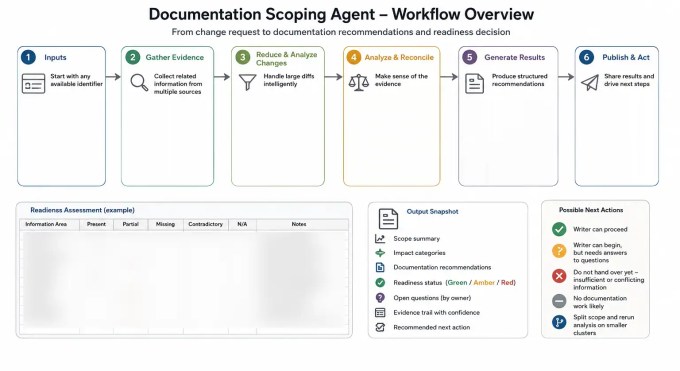
A documentation scoping agent works in this way:
- Start with an issue, pull request, commit range, feature name, or release version.
- Gather related evidence from tickets, code, tests, product requirements, and existing documentation.
- Produce a structured assessment.
Typically, the assessment report states:
- What the change appears to do.
- Whether the issue and implementation agree.
- Which audiences and product behaviours are affected.
- Which documentation needs an update, review, or new page.
- Which information is missing, stale, or contradictory.
- Whether a writer can proceed.
The agent can also preserve a link to the source behind every important claim.
Evidence, rather than assertion
A ticket describes intended work, but it is not proof of implemented behaviour.
A pull request describes implementation work, but it might not explain the user goal, release decision, or documentation treatment.
Existing documentation records what someone previously believed to be true. That might now be stale.
The agent should keep these sources separate, and record whether each finding is directly stated or inferred.
Consider a bulk-transfer feature. The ticket says users can transfer up to 100 records, but the code itself accepts 500. Which number should the writer publish?
The answer is, of course, neither until someone resolves the conflict.
A weak AI system will pick one of those two numbers and start writing.
A scoping agent will, instead, report the contradiction. It will also identify the likely documentation areas, and ask the question: which limit applies in this release?
Make readiness to document visible
We use a readiness matrix. Each information area is marked as present, partial, missing, contradictory, or not applicable. The overall result is:
- Green: there is enough evidence for a writer to proceed.
- Amber: the writer can begin, but important questions remain.
- Red: the source information is insufficient or contradictory.
The agent can also conclude that no documentation work is likely, or that a large scope should be split, and analysed again.
Biasing the system towards silence is useful. Five credible review items are more useful than 40 speculative documentation tasks. You don’t want to overwhelm the writers.
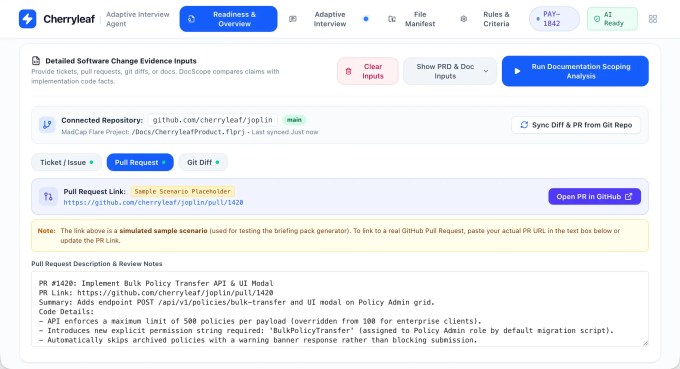
The agent reports the scope, compares the ticket with the implementation, and recommends whether a writer can begin.
Reducing hallucinations
Large language models generate probable responses. When evidence is incomplete, they can invent stuff.
A documentation scoping workflow needs controls around the model:
- Retrieve source material before generating recommendations.
- Require evidence for every important claim.
- Separate direct statements from inferences.
- Preserve source links and confidence levels.
- Treat uncertain impact as a review item, not a definite update.
- Stop when evidence is weak or contradictory.
- Require human review before publishing documentation changes.
Some organisations use a second model to challenge the first. That can find errors, but two models can share the same blind spots.
An inspectable evidence trail is still the stronger control.
Failures should also become tests. If the agent mistakes a gated feature for a released feature, add a feature-flag check. If it trusts a release note over the implementation, add a check for shipping evidence.
Trust comes from observed performance and correction. It should not be granted because the agent produced a tidy table.
Start with a prompt
The first version does not need to be an application or a skill. You can start with a prompt.
A structured prompt can define the evidence order, classifications, readiness fields, and output format.
Running it manually helps a team see how the model interprets relationships between tickets, code, tests, and documentation.
Once the process is repeatable and reliable, you can create a reusable skill or application. You can then add connections to issue trackers, source control, and documentation repositories.
- Start with one product area and a manageable set of completed changes.
- Compare the recommendations with the decisions your writers actually made.
- Record false positives, missed changes, and unsupported claims.
- Turn those failures into rules and tests.
The aim is to give technical writers an evidence-backed starting point and expose missing information earlier.
Need help with using AI in technical documentation?
Cherryleaf can help. See:
Leave a Reply