
Summary
- This article examines what can be automated and argues that automation supports, but cannot replace, human expertise.
- Technical writing automation improves consistency, speed, and discoverability by handling repetitive tasks and enforcing standards.
- AI agents add adaptive decision‑making.
- However, these tools introduce risks such as fragility, hidden assumptions, security issues, and loss of institutional knowledge.
- Technical writers remain essential for audience analysis, editorial judgement, accuracy, and maintaining durable, user‑centred documentation across the product lifecycle.
Defining automation and agents
Every agent is an automation, but not every automation is an agent.
What is automation?
Automation uses software to handle repetitive digital tasks automatically, based on predefined rules.
Automation has been part of technical writing for many years. For example, Help Authoring Tools, such as MadCap Flare, normally manage the links in topics and convert topics to HTML.
What are AI agents?
AI agents are a step beyond automation. Unlike static automations, they exhibit goal-directed, adaptive behaviour.
The difference from automation is that agents don’t just follow a rigid workflow; instead, they use AI to make decisions and adapt.
Google’s definition of an agent is that is:
an application that achieves a goal by observing the world and acting on it with the tools at its disposal.
For example, you can create an AI agent that decides how to respond or route emails.
Why automate technical writing processes?
Automation promises to improve efficiency and create better outputs. The main benefits relate to consistency, speed, and discoverability.
Consistency
Automation turns subjective preferences into explicit rules. For example:
- Vale enforces style and terminology consistency across multiple authors through configurable rules.
- GitLab’s documentation workflow demonstrates using error-level rules enforced in its build pipelines.
In AI-assisted workflows, consistency comes from encoding rules, examples, and anti-patterns into instruction files that every contributor – human or agent – reads before acting. This replaces informal convention with an explicit, reviewable standard.
Speed
Speed comes from eliminating repeated, manual or cognitive work. For example: finding the right template or performing mechanical checks.
In docs-as-code environments, continuous Integration removes the manual checking of basics , such as broken links and style violations.
Discoverability
Discoverability improves when documentation and instruction artefacts live where engineers and writers already work. Standard tooling can then index them.
Docs-as-code improves discoverability by co-locating docs with code and putting them through the normal development workflow. This increases ownership. It also makes it possible to block merges when docs are missing.
RAG-based knowledge layers increase discoverability by retrieving relevant snippets at the point of need. However, they require strong governance. Without it, they risk becoming an untrusted “documentation oracle” that mixes stale and current information.
What do you automate?
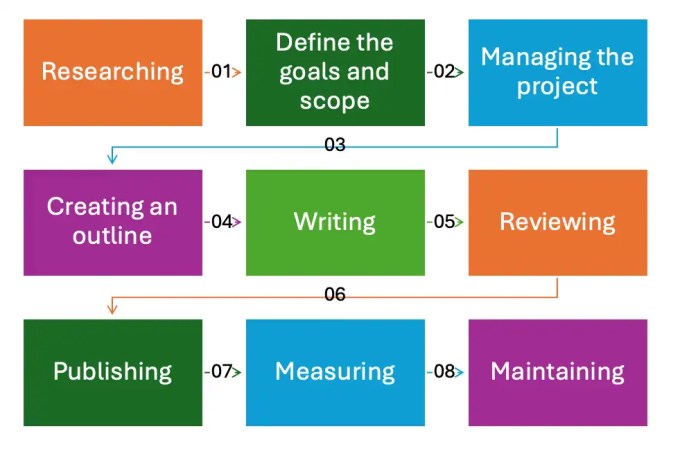
There are multiple stages involved in creating user documentation, as shown in the image below:
Automating discrete activities
You can use automation to carry out individual tasks in the workflow. For example, you can create an app that automatically generates alt text for an image, or an app that optimises content for humans and LLMs.

Automating the process
You can also create automated processes that act when triggered, and chain multiple processes. For example, routing a document for SME review and chasing approvals automatically.

The challenge in doing this is that it often relies on other people changing their behaviour. They might not use your process in the way that you had wished (if they use it at all), if they don’t think documentation is important, or if it’s inconvenient to them.
Automating validation
“Docs as Tests” is the name for an approach to keep documentation in sync with product changes through automated validation. Writers use open source software tools, such as Doc Detective, to run tests and validate documents are accurate and that the product is functioning as expected.
Automation patterns
Another way to view automation in technical writing is as three layers:
- Production automation
- This relates to the build, deploy, and QA stages in the workflow.
- This is deterministic tooling that should be testable and fail predictably.
- Instruction automation
- This relates to templates, skills, and any repositories of prompts.
- These are policies and procedures that have been encoded so humans and agents behave consistently.
- Knowledge automation
- These are retrieval and grounding mechanisms that make “the right information” available at the point of writing or answering.
Limitations and risks
Automation is powerful precisely because it encodes assumptions. The risks arise when those assumptions are hidden or become the only place knowledge exists.
Logging, tracing, and audit trails
The operational requirement for automation is observability. If you cannot answer “why did the system produce this output?”, you don’t have a maintainable workflow.
Automation does not replace human-facing documentation
There was a recent article claiming you could use skills files to remove the need for human-readable documentation.
In practice, they two serve different purposes:
- Agent instruction files, such as skills, encode repeatable steps for a tool to follow.
- Documentation helps people understand things such as architecture rationale, onboarding, conceptual models, constraints, and organisational decisions.
Neither can substitute for the other.
Furthermore, instruction files also require ongoing maintenance. Outdated instructions produce outdated output.
There are costs to workflow automation
It takes time to build and maintain a pipeline, rules, and any assets in an automation. They also require ownership. Someone must update Vale rules when style guidance changes. This is also true for revising templates when content standards change.
There is also an upfront investment in toolchain adoption.
The AI magic problem
The “AI magic problem” is a buzzword for systems that appear to work “by magic” because it’s not clear what’s driving their behaviour. That information is effectively hidden in the prompts and retrieved context.
A small change can break everything, and nobody can explain why.
AI’s lethal trifecta
There is a security risk if you combine trusted system instructions with untrusted external content. Attackers can hide instructions in documents or webpages to hijack behaviour.
Fragility
Modern workflows often assume “just add more context” will make agents reliable. This is risky. LLMs can fail to use distant information, even with large context windows. This directly challenges any strategy that assumes the model will always read included rules and docs.
Vendor lock-in and organisational resilience
Instruction mechanisms are currently fragmented. Claude Skills, ChatGPT GPTs/Skills, Gemini Gems, Copilot instructions, AGENTS.md files, and tool-specific rule formats overlap conceptually. However, they differ in implementation and governance.
This fragmentation can also create lock-in via operational dependence.
Having said that, there is an industry move to reduce lock-in via open standards. OpenAI explicitly positions AGENTS.md as an open format. This aims to prevent fragmentation and improve portability and safety.
Some vendors are moving toward open, portable formats for instruction files. The goal is to allow the same governance layer to drive multiple AI surfaces, with vendor-specific variants generated from a canonical source rather than maintained independently.
Loss of institutional knowledge
Organisations risk a form of institutional amnesia if rationale, constraints, and domain knowledge are encoded only in skills or prompts:
- New staff cannot learn unless they use the agent correctly.
- Audits cannot easily establish “who decided what and why”.
- Knowledge transfer becomes dependent on a vendor surface and current model behaviour.
Human-in-the-loop governance and the role of technical writers
Technical Authors do more than write. There are responsibilities that must not be automated:
- Deciding what information is needed
- Editorial judgement
- Accuracy and completeness when content relates to safety, security, or compliance.
- Architectural and product decisions
A useful mental model is to treat AI-generated output as a first draft from a fast but literal contributor. It’s a collaborative activity.
See also
You might be interested in our course Managing and mastering documentation projects with AI.
Leave a Reply